Files
Send in both directions
Upload to Android or download from it using the browser you already have. Progress stays visible while files move.
Private sharing over your local network
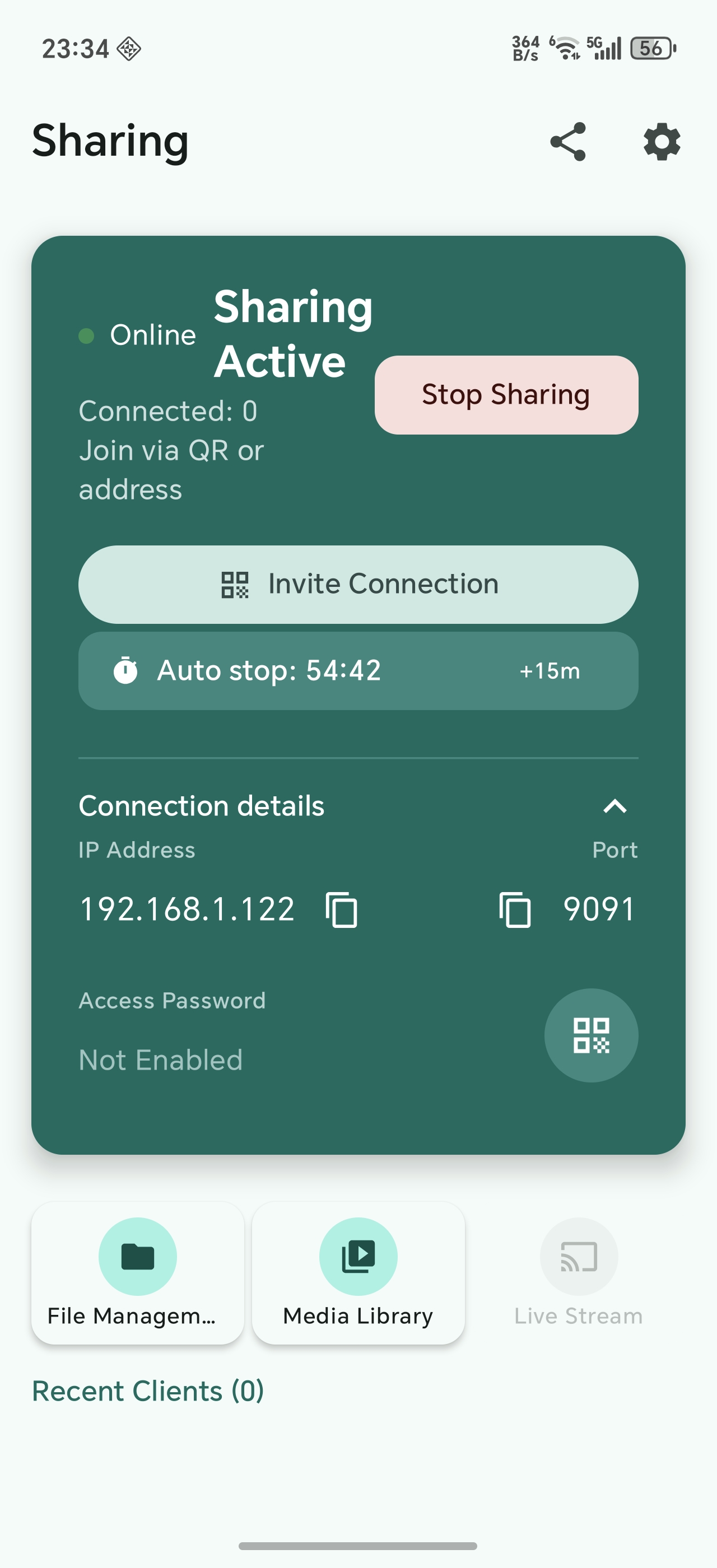
Turn an Android phone or tablet into a local sharing hub. Send files, play media, and share a live screen—receivers only need a browser.
One link works across the devices you already own
From zero to sharing
If both devices are on the same Wi-Fi or hotspot, you are ready.
Open the Android app and start sharing on your Wi-Fi or hotspot.
Receivers scan the QR code or type the local address in any browser.
Transfer files or stream media directly over your local network.
Built for real sharing
Move more than files. Make the media and screen already on your Android available to the room.
Upload to Android or download from it using the browser you already have. Progress stays visible while files move.
Open photos, music, and video from a phone on a laptop, tablet, or TV browser.
Broadcast your screen or camera feed to browsers nearby with low-latency playback.
Use an access password, see recent connections, choose when the server stops, and end sharing instantly.
One app, many moments
Move a large file to a laptop without cables, accounts, or messaging limits.
Share handouts or a live demonstration to students on the same local network.
Open phone videos on a larger screen using the TV or tablet browser.
Local by design
LocalHub transfers your shared files and media directly over the local network instead of uploading them to our cloud. Optional access protection helps keep the session yours.
Read the privacy policyReady when your Wi-Fi is
Install LocalHub on one Android device. Everyone else can simply open a browser.
Download onGoogle Play